Dynamic send ports are used to send the BizTalk messages dynamically from orchestration to destination systems based on some conditions.
Two Way Dynamic Send Port
Two-way dynamic sendports are used for request and response messages.
We need to create logical dynamic sendport with port direction as dynamic.

We need to construct the message with all request and response message properties of Rest endpoint as below
In the message assignment shape we need to construct the message with below properties.
RequestForRouting = Request;
//Request is the input message type of your orchestration receive shape. RequestForRouting is the message which we construct in this message assignment shape.
RequestForRouting(BTS.RouteDirectToTP)=false;
headerhttp = Request(WCF.InboundHttpHeaders);//If you have any http headers
RequestForRouting(FILE.ReceivedFileName) = headerhttp;
RequestForRouting(WCF.HttpMethodAndUrl) = “POST” //For POST Operation
RequestForRouting(WCF.HttpMethodAndUrl)=”<BtsHttpUrlMapping><Operation Name=” Method=’GET’ Url=’/RestServiceURL’ /></BtsHttpUrlMapping>”; // For Get Operation
RequestForRouting(BTS.SendPipelineConfig)=”<Root xmlns:xsd=’http://www.w3.org/2001/XMLSchema’ xmlns:xsi=’http://www.w3.org/2001/XMLSchema-instance’><Stages><Stage CategoryId=’9d0e4108-4cce-4536-83fa-4a5040674ad6′><Components><Component Name=’Microsoft.BizTalk.Component.JsonEncoder’><Properties><RemoveOuterEnvelope vt=’11’>-1</RemoveOuterEnvelope></Properties></Component></Components></Stage></Stages></Root>”;
RequestForRouting(BTS.SendPipelineResponseConfig) = “<Root xmlns:xsd=’http://www.w3.org/2001/XMLSchema’ xmlns:xsi=’http://www.w3.org/2001/XMLSchema-instance’><Stages><Stage CategoryId=’9d0e4103-4cce-4536-83fa-4a5040674ad6′><Components><Component Name=’Microsoft.BizTalk.Component.JsonDecoder’><Properties><RootNode vt=’8′>” + RootNodeName + “</RootNode><RootNodeNamespace vt=’8′>” + Namespace + “</RootNodeNamespace></Properties></Component><Component Name=’Microsoft.BizTalk.Component.XmlDasmComp’><Properties><AllowUnrecognizedMessage vt=’11’>-1</AllowUnrecognizedMessage></Properties></Component></Components></Stage></Stages></Root>”;
RequestForRouting(WCF.VariablePropertyMapping)=String.Empty;
//For POST Operation
RequestForRouting(WCF.VariablePropertyMapping)=
“<BtsVariablePropertyMapping xmlns:xsi=’http://www.w3.org/2001/XMLSchema-instance’ xmlns:xsd=’http://www.w3.org/2001/XMLSchema’><Variable Name=NameoftheVariable PropertyName=’NameOftheProperty‘ PropertyNamespace=’NameSpace‘/></BtsVariablePropertyMapping>”;
//For Get Operation
RequestForRouting(WCF.SuppressMessageBodyForHttpVerbs)=String.Empty;
//For POST Operation
RequestForRouting(WCF.SuppressMessageBodyForHttpVerbs)=”GET”;
//For Get Operation
RequestForRouting(BTS.RetryCount) = 0;
RequestForRouting(WCF.MaxReceivedMessageSize)=2147483647;
RequestForRouting(WCF.OpenTimeout)=”00:01:00″;
RequestForRouting(WCF.CloseTimeout)=”00:01:00″;
RequestForRouting(WCF.SendTimeout)= “00:01:00”;
RequestForRouting(WCF.EndpointBehaviorConfiguration)=”<behavior name=’EndpointBehavior’><AddHttpHeader HeaderFields=’Field1,Field2,Content-Type: application/json’/></behavior>”;
// If you have http headers
In the expression shape, we need to specify Address and TransportType.
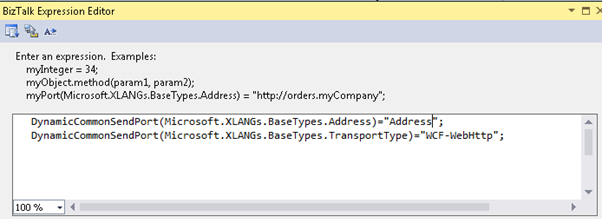
DynamicCommonSendPort(Microsoft.XLANGs.BaseTypes.Address)=”Rest Endpoint URL Name”;
DynamicCommonSendPort(Microsoft.XLANGs.BaseTypes.TransportType)=”WCF-WebHttp”;
Good Luck…


 BizTalk World
Leave a comment